
Better rate information. Better conversations.
A posted load price does not always reflect what a lane is worth in the current market. LaneVision adds freight lane rates and trucking lane rates context so you can research the market before you respond to a broker, shipper, or dispatcher.
Know the Market
See market rate intelligence for the origin–destination lane and equipment type you are evaluating.
Negotiate Stronger
Walk into rate conversations with current market context from a dedicated load board rate tool workflow inside Dispatch.
Plan Smarter
Compare lanes and use freight market rates when deciding where your truck should go next.
How LaneVision works
Enter your lane
Choose origin, destination, equipment type, and optional search criteria such as miles or radius.
See market intelligence
LaneVision retrieves market rate information powered by Farelanes for your lane search.
Make a better-informed decision
Use the results when evaluating, quoting, negotiating, or planning freight—without leaving Trulos Dispatch.
Freight rate research built for real lanes
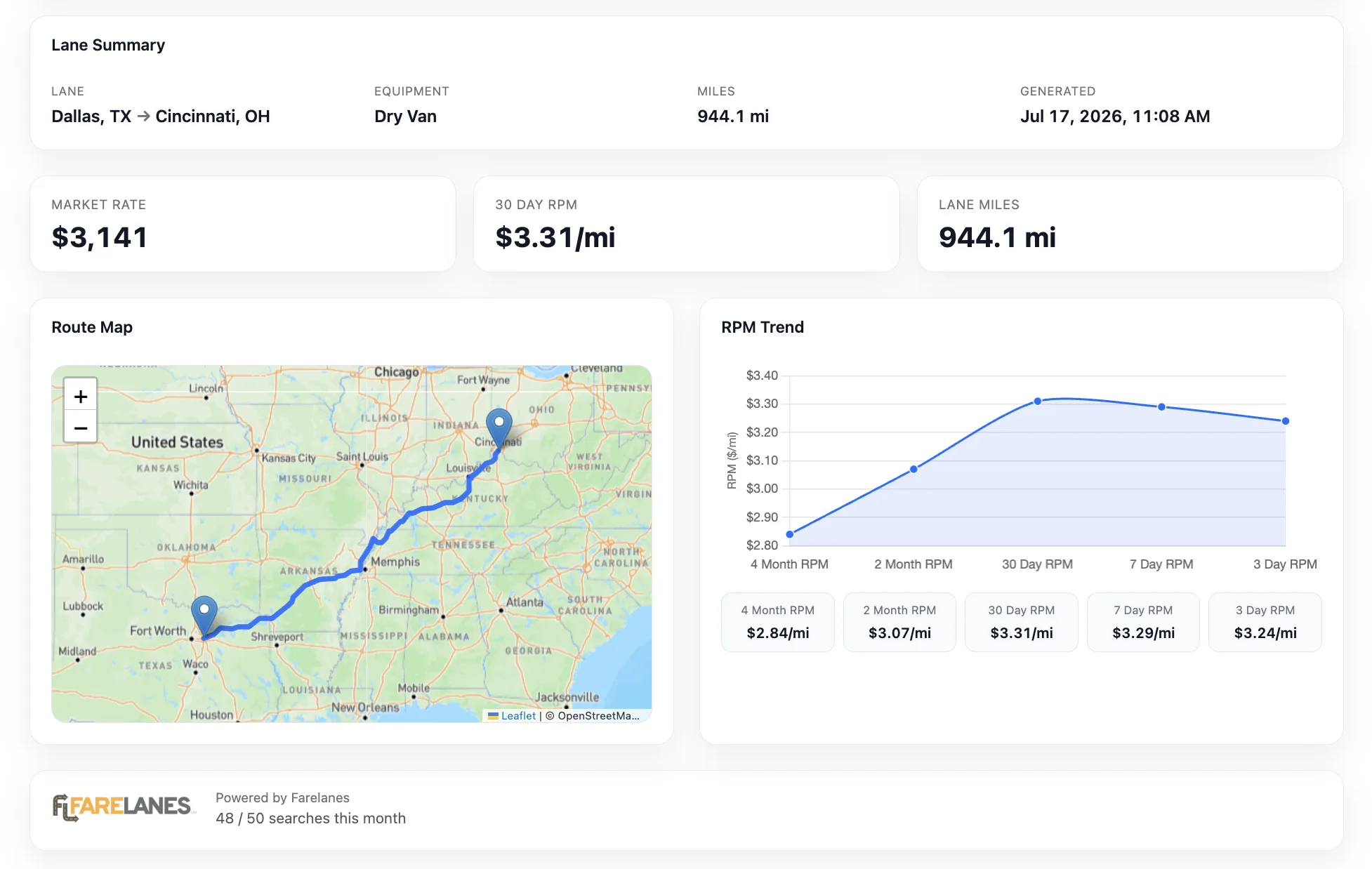
LaneVision is a freight rate research tool inside Trulos Dispatch. Search city-to-city lanes, review market metrics, and optionally compare an offered rate against the market when you enter one.
- Origin and destination lane search with equipment selection
- Market rate and 30-day RPM for the lane
- Recent searches for quick follow-up lane lookups
- Route map visualization for the lane
- RPM trend chart when Farelanes has sufficient recent lane data
- Optional offered-rate comparison (above/below market)
- Printable lane report for your records
Rate intelligence where you’re already looking for freight.
LaneVision is integrated into the Trulos ecosystem. From the Dispatch load board, open a load and jump into LaneVision with lane details prefilled—so you can move between finding freight and researching freight market rates without disconnected spreadsheets or guesswork.
Public tools like the free load board and Freight Rate Intelligence hub help you explore the market at large; LaneVision focuses on the specific lane you are working inside Dispatch.
Try LaneVision in DispatchConnected workflows
Trulos Load Board in Dispatch — review loads and open LaneVision from load details when lane context is available.
LaneVision — run a dedicated lane search with market rate intelligence powered by Farelanes.
Built for everyone who prices freight
Carriers & Owner-Operators
Check lane context before accepting a load or countering on rate.
Dispatchers
Support client and carrier conversations with current market rate information.
Freight Brokers
Sanity-check pricing on lanes you are quoting or covering with carriers.
Shippers
Understand truckload market rate context when planning lanes and budgets.
Part of the Trulos platform
LaneVision connects to the same Trulos tools you use to find freight, run dispatch, and manage your business.
Know the market before you move the load.
Search lanes, review market rate intelligence, and put better information behind your next freight decision.